Personal
$8.25/month
$99 billed once a year
- All fields and blocks
- One year of updates and support
- Full documentation for you and Claude Code
Create sliders, interactive components and custom layouts with their own editing controls and nested blocks. Write your templates in PHP and HTML; GCB handles the Gutenberg editing experience.
No React. No build step. Three files for a PHP-rendered block.
30-day money-back guarantee.
<Repeater allowedBlocks='["gcb/slide"]' addButtonLabel="Add slide" max="24" editLayout="carousel"/><h1 data-gcb-field="heading" data-gcb-field-type="text"> <?php echo esc_html($a['heading']); ?></h1><a data-gcb-field="cta" data-gcb-field-type="url" href="…">…</a><img data-gcb-field="photo" data-gcb-field-type="image" src="…"><InnerBlocks data-gcb-slot="0" allowedBlocks='["core/heading","core/paragraph"]' /><img data-gcb-field="photo" …><InnerBlocks data-gcb-slot="1" allowedBlocks='["core/buttons"]' />{ "label": "Heading", "attributeKey": "heading", "validation": { "required": true, "maxLength": 48 } },{ "label": "Intro", "attributeKey": "intro", "validation": { "maxLength": 120 } }<Repeater allowedBlocks='["gcb/frame"]' addButtonLabel="Add frame" min="2" max="4"/>{ "label": "Video", "type": "oembed", "conditionalLogic": { "enabled": true, "rules": [ { "field": "cta_goes", "operator": "==", "value": "video" } ] } }{ "apiVersion": 3, "name": "gcb/solace-badge", "title": "Solace badge", "category": "widgets", "icon": "tag"}{ "controls": [ { "id": "c_label", "type": "text", "label": "Label", "attributeKey": "label", "default": "New in" } ]}<?php $label = esc_html($attributes['label'] ?? ''); ?><div <?php echo get_block_wrapper_attributes(['class' => 'sol-badge']); ?>> <span data-gcb-field="label" data-gcb-field-type="text"><?php echo $label; ?></span></div>Three files make a block. Add them to your theme and refresh Gutenberg. The block appears in the inserter, ready to use. Its label can be edited directly on the page.
PHP is the default, but your blocks don't have to render in WordPress.
GCB can fetch rendered HTML from an external frontend. Use Next.js, Astro, Nuxt, SvelteKit or another framework. Your frontend renders the component, and GCB uses the returned HTML for the Gutenberg editing experience.
Twig and Blade work through your own bridge. If your stack can return HTML, you can use it to render a block.
A working WordPress installation with GCB and the Solace sunglasses blocks, running right here in your browser.
Edit text on the page, add frames and slides, and drag elements to change the layout. Nothing to install, and nothing you do leaves your browser.
Starting WordPress in your browser: about 15 seconds the first time.
GCB is for developers who need more than a collection of existing blocks and reusable layouts. It gives you a way to build custom blocks with their own functionality, fields and editing experience.
Here's how it compares with other ways of building WordPress editing experiences.
| Feature | GCB | ACF Blocks | block.json + React | Page builders |
|---|---|---|---|---|
| Standard Gutenberg blocks, registered with block.json | Yes | Yes | Yes | No |
| 42 field types, saved as JSON | Yes | 30+, with Local JSON | Build each one | Their own widgets |
| Edit text directly on the page | Yes | Yes (ACF PRO 6.7+, opt-in) | If you code it | Yes |
| One template for editor and front end | Yes | Yes | No, edit.js and render | – |
| Repeatable blocks on the page | Yes | With InnerBlocks | Build it | Some |
| Multiple InnerBlocks areas in one block | Yes | One | One | – |
| Fields for posts, options, terms and users | Yes | Yes | register_meta, by hand | No |
| Batch rendering, one request per page | Yes | – | No, one per block | – |
| Fields using theme.json tokens | Yes | – | By hand | Their own system |
| Headless with visual editing | Yes | – | No | No |
Optional: headless
You don't need a headless frontend to use GCB. It works on an ordinary WordPress site with a PHP theme.
But when you do want a separate frontend, you can keep editing your blocks visually in Gutenberg. GCB renders your frontend components in the editor, so clients work with the same design they'll see on the site.
Nothing to change on a PHP site. Blocks with a PHP template render in WordPress as usual. Headless rendering only starts when you point GCB at an external frontend.
Write your components in React and mark the parts that clients can edit. GCB uses the rendered HTML to provide the editing experience in Gutenberg. There's no separate editor version of each component to maintain.
Both types of blocks can sit on the same page in Gutenberg. Use PHP where it makes sense and external rendering where you need it. Move blocks across when you're ready, or leave them as they are.
Choose a plan for the number of sites you need.
Every licence includes all features, one year of updates and support, and full documentation for you and Claude Code.
Prices are in US dollars and billed annually.
$8.25/month
$99 billed once a year
$20.75/month
$249 billed once a year
$41.58/month
$499 billed once a year
30-day money-back guarantee.
Prices are in US dollars. Licences renew each year at the same price, and you can turn off renewal at any time.
Local and staging sites don't count towards your licence limit. This includes localhost, *.localhost, *.test, *.local, staging.* and dev.*.
Requirements: WordPress 6.8 or later and PHP 7.4 or later.
GCB is licensed under the GPL (version 2 or later). Your licence includes one year of updates and support.
If you ever stop using GCB, you can take your blocks with you.
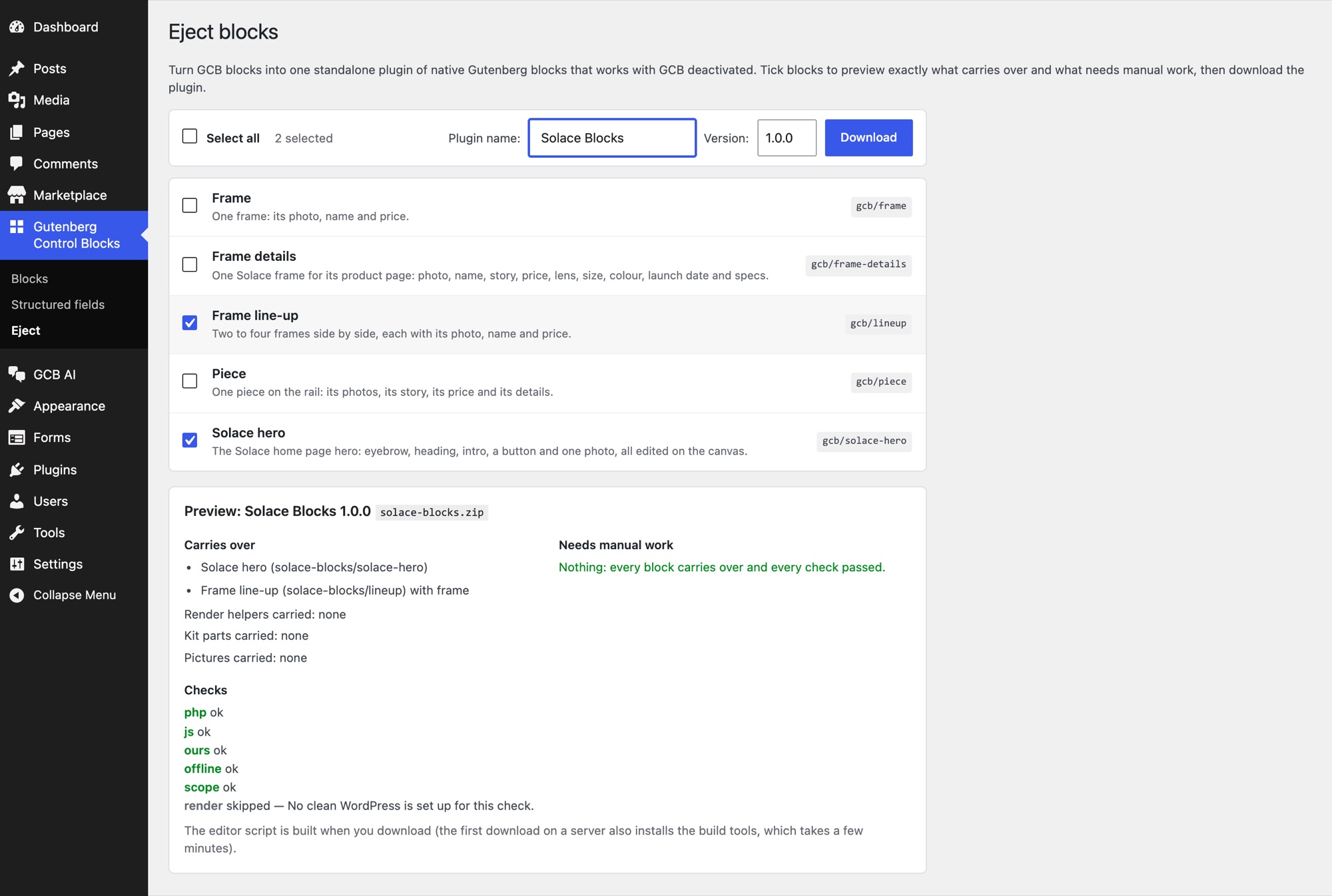
The Eject tool converts your blocks into a standalone WordPress plugin containing the blocks, their fields, editor and front-end scripts. The result is GPL-licensed, needs no GCB licence and never contacts GCB.
Validation, repeater limits and multiple InnerBlocks areas come with them.
Use Move Content to switch your existing pages to the new blocks. Every move can be undone. Once you've moved your content, deactivate GCB.
Your clients can still edit the ejected blocks in the sidebar with a live preview, rather than on the canvas.
Your sites keep working. GCB has no licence check in the plugin, so your blocks and content stay as they are.
You just won't be able to download new versions until you renew.
Every licence includes one year of updates and support.
Need a hand? Email us at support@gutenbergcontrolblocks.com.
Every code change runs through more than 1,000 automated tests covering PHP, the Gutenberg editor and every kit block.
Each block is a folder containing block.json, block.fields.json and render.php. GCB registers it with WordPress like any other block, so there's nothing to register yourself.
Keep your blocks in Git alongside your theme and version them with the rest of your project.
It's a professional development tool for WordPress developers and agencies: a plugin for building your own Gutenberg blocks in code, with fields, including text, images with focal points, maps, layouts, paths, layered scenes and more: 42 field types in all. You write the block's template in anything: PHP, React, Vue or plain HTML if you want. You list its fields in JSON, and your client edits the block in the editor they already know. It's code-first: there's no drag-and-drop block designer, and it isn't a no-code or low-code tool.
There are two ways, and you write code in both. In neither do you register the block: there's no register_block_type() call and nothing to add to functions.php. GCB finds the folder and registers it.
In your theme: add a folder to your theme's blocks/ folder with three plain files: block.json, block.fields.json and render.php. The editor draws the block from that same template, so it's 1:1 with the page. There's no edit.js and no build step.
In your own front end: keep the first two files in the theme and write the template as a component in the front end you're building, such as React, Vue or Svelte. The editor asks your front end to draw the block.
To scaffold the folder, run wp gcb scaffold team-grid --controls="heading:text,intro:textarea". How to build a block has both ways step by step.
No. GCB is for developers: you build each block in code, with a JSON file of fields and a template you write. It extends WordPress rather than replacing it. Each block is registered with block.json, its fields use the same @wordpress/components as the core editor, and its colours and sizes come from theme.json and WordPress's --wp--preset--* variables. As WordPress changes, your blocks keep working with it.
No. GCB does the jobs you'd install ACF or a blocks plugin for. It has 42 field types, including repeaters, galleries, links and post pickers, with conditional logic and validation. It does the content modelling too: custom post types and taxonomies are defined in JSON files, and the same fields work on posts, taxonomy terms, options pages and user profiles, not only in blocks.
Your client edits on the page, and GCB goes further than ACF Blocks in a few places: a block can have several InnerBlocks areas, fields can offer your theme's theme.json colours and spacing, and every block preview on a page loads in one request. The comparison table has the details.
If a site already uses ACF, you don't have to remove it. The two run side by side, so you can move over one block at a time.
Yes. A GCB block is a normal Gutenberg block. It sits on the same page as core blocks and blocks from any other plugin, and your client adds, moves, copies and deletes it in the same way.
Core blocks and other plugins' blocks can go inside a GCB block's InnerBlocks areas, and GCB blocks work in patterns, synced patterns, the Site Editor and List View. Their content is saved as ordinary block attributes in the post, like every other block.
Yes, and with other coding agents too. Each block is a folder of plain files, and the full documentation is public and ships as llms.txt, so your agent can read it. Agents can also pipe a JSON spec to wp gcblite scaffold --stdin. If you ask for a store locator, for example, the agent builds one with the fields your client needs.
Each licence comes with a key for its number of sites: a Personal licence covers one site, Freelancer covers ten, and Agency covers as many as you like. The key gives those sites a year of updates and support.
Yes. Open Billing, sign in with your email and choose the bigger plan. You pay the difference for the rest of your year, and you keep the same licence key.
Go to your account and enter the email address you bought with. We email you a sign-in link, with no password, that shows your key, the sites using it and the plugin download. You can free a site's place there too, and open Billing for invoices.
No. Sites on localhost, *.localhost, *.test, *.local, staging.* and dev.* are free. Only live sites count towards your limit.
Yes. If GCB isn't right for you, ask for a refund within 30 days and you'll get your money back in full.
No. GCB fetches every block's preview in one request instead of one per block, reuses previews that haven't changed, and doesn't contact the server while your client types on the page.
Only as much as you let them. Where you use InnerBlocks, your client can add and arrange blocks, but only the ones you've allowed. Where you use typed fields, they can only fill in what you've defined: colours and spacing come from your theme's tokens, and a list's minimum and maximum stop the page from saving until it's right. You can mix both in one block.
Yes. Declare the type in PHP with gcblite_register_control_type() on the gcblite_register_control_types action, and register its React component with window.gcbLiteControls.register(). It then works in any block.fields.json, like the built-in fields. Every gcblite_* action and filter is listed in the docs too, such as gcblite_block_dirs for loading blocks from your own plugin.
No. If your licence lapses, your sites keep working: GCB has no licence check, so blocks and content stay as they are and you just can't download new versions (licences and updates). Your templates are your own code (PHP, React, Vue or plain HTML) and your fields live in block.fields.json, versioned in Git. And if you want to leave GCB altogether, eject turns your blocks into a standalone plugin of native blocks; read what carries over before you do.
Still got a question? Email support@gutenbergcontrolblocks.com.
The next generation of WordPress development
WordPress built to modern development standards: everything in code and version control, and control of every block. Real Gutenberg blocks, 1:1 visual editing, your theme's design tokens, 40+ field types and nothing to migrate away from later.