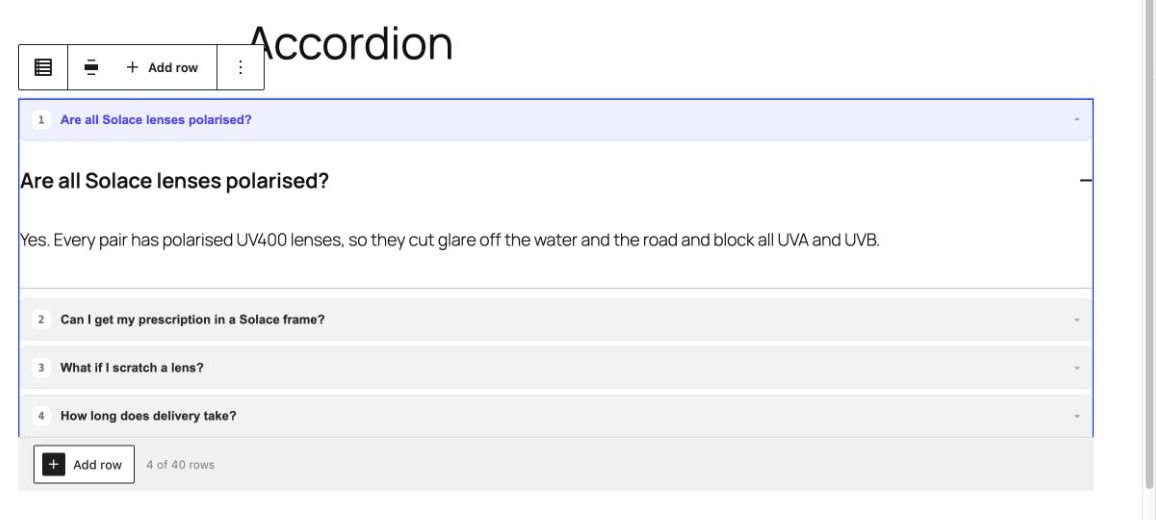
An accordion for FAQs, specs and other long lists. Each row is a block of its own: a title your client types on the canvas, and any blocks underneath it. Two settings choose whether one row is open at a time and whether the first starts open.
Download example A zip of block folders for your theme. Needs GCB 1.3.1 or later, and nothing else.
What's in the download
accordion/The accordion and its two settings.accordion-item/One row: a title and any blocks beneath it.
Each folder is an ordinary GCB block: block.json, block.fields.json and render.php, plus a style.css and a view.js where it needs them. There is no build step and no library.
How it's built
A <Repeater> in the accordion's template marks where the rows go and sets how few and how many there can be. Every row is real content in the page, so search engines and screen readers get all of it.
<Repeater allowedBlocks='["gcb/accordion-item"]' addButtonLabel="Add row" min="1" max="40" editLayout="accordion"/>Its fields, from block.fields.json:
| Field | Type |
|---|---|
| One open at a time | toggle |
| First row open to start | toggle |
view.js is about 2 KB of plain JavaScript. With no script, every row is open.
Use it
- Unzip the download.
- Copy
accordion/andaccordion-item/into your theme'sblocks/folder. - Reload the block editor. The block is in the inserter.
That's all of it. You don't register the block: there's no register_block_type() call and nothing to add to functions.php. GCB registers every folder in your theme's blocks/ folder by itself.
It is your block now. Change the markup, the fields or the script to suit the design. The docs cover every field type and marker used here.
More examples: all examples, or download them together as the GCB Kit.