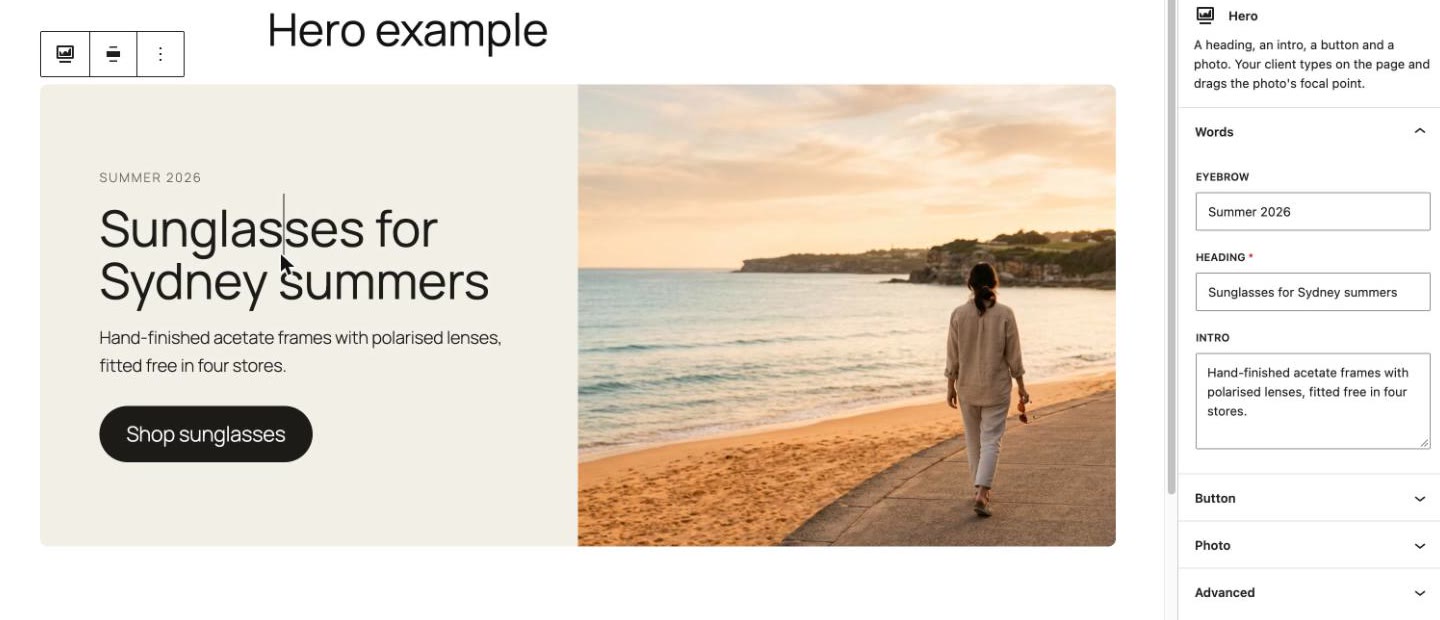
A hero: an eyebrow, a heading, an intro, a button and a photo. Your client types the words and the button's label on the page, sets the button's address with the toolbar's Link button, and gives the photo a focal point so the crop keeps the subject in frame. It is three plain files in your theme and a stylesheet.
Download example A zip of one block folder for your theme. Needs GCB 1.3.1 or later, and nothing else.
The whole block
Create blocks/hero/ in your theme. The folder name is the block's name, so this registers as gcb/hero.
block.json is WordPress's standard block metadata. There are no attributes in it: GCB makes them from the fields.
{ "apiVersion": 3, "name": "gcb/hero", "title": "Hero", "description": "A heading, an intro, a button and a photo. Your client types on the page and drags the photo's focal point.", "category": "design", "icon": "cover-image", "supports": { "html": false, "align": [ "wide", "full" ] }, "style": "file:./style.css"}block.fields.json lists the fields, in three groups that become panels in the sidebar. The heading is required and limited to 60 characters. The button is one url field, which stores the address, the label and whether it opens in a new tab. The photo is an image field with a focal point.
{ "controls": [ { "id": "p_words", "type": "group", "label": "Words" }, { "id": "p_button", "type": "group", "label": "Button" }, { "id": "p_photo", "type": "group", "label": "Photo" }, { "id": "c_eyebrow", "type": "text", "label": "Eyebrow", "attributeKey": "eyebrow", "default": "New this season", "parentPanelId": "p_words" }, { "id": "c_heading", "type": "text", "label": "Heading", "attributeKey": "heading", "default": "A heading that says what you do", "parentPanelId": "p_words", "validation": { "required": true, "maxLength": 60 } }, { "id": "c_intro", "type": "textarea", "label": "Intro", "attributeKey": "intro", "default": "One or two sentences that back the heading up.", "parentPanelId": "p_words", "validation": { "maxLength": 200 } }, { "id": "c_button", "type": "url", "label": "Button", "attributeKey": "button", "parentPanelId": "p_button", "default": { "url": "/contact", "text": "Get in touch", "opensInNewTab": false } }, { "id": "c_photo", "type": "image", "label": "Photo", "attributeKey": "photo", "enableFocalPoint": true, "parentPanelId": "p_photo" } ]}render.php is the template, for the editor and the page alike. It reads the values from $attributes. Each data-gcb-field attribute marks something your client edits where it sits.
<?php/** * Hero: an eyebrow, a heading, an intro, a button and a photo. * * Everything marked data-gcb-field is edited where it sits on the page: the words and the button's label are * typed, the button's address is set from the Link button in the block toolbar, and the photo is swapped from * the Photo button there. * * @var array $attributes The block's field values. */ // A field that stores an object (a link, an image) can arrive as an object or an array.$as_array = static function ( $value ) { return is_object( $value ) ? json_decode( wp_json_encode( $value ), true ) : (array) $value;}; $button = $as_array( $attributes['button'] ?? array() );$photo = $as_array( $attributes['photo'] ?? array() );$focal = $as_array( $photo['focalPoint'] ?? array() ) + array( 'x' => 0.5, 'y' => 0.5 );$place = round( (float) $focal['x'] * 100 ) . '% ' . round( (float) $focal['y'] * 100 ) . '%';?><section <?php echo get_block_wrapper_attributes( array( 'class' => 'hero-block' ) ); ?>> <div class="hero-block__words"> <p class="hero-block__eyebrow" data-gcb-field="eyebrow" data-gcb-field-type="text"><?php echo esc_html( $attributes['eyebrow'] ?? '' ); ?></p> <h1 class="hero-block__heading" data-gcb-field="heading" data-gcb-field-type="text"><?php echo esc_html( $attributes['heading'] ?? '' ); ?></h1> <p class="hero-block__intro" data-gcb-field="intro" data-gcb-field-type="textarea"><?php echo esc_html( $attributes['intro'] ?? '' ); ?></p> <?php if ( ! empty( $button['text'] ) ) : ?> <a class="hero-block__button" data-gcb-field="button" data-gcb-field-type="url" href="<?php echo esc_url( $button['url'] ?? '#' ); ?>"<?php echo ! empty( $button['opensInNewTab'] ) ? ' target="_blank" rel="noopener noreferrer"' : ''; ?>><?php echo esc_html( $button['text'] ); ?></a> <?php endif; ?> </div> <div class="hero-block__photo"> <?php if ( ! empty( $photo['url'] ) ) : ?> <img data-gcb-field="photo" data-gcb-field-type="image" src="<?php echo esc_url( $photo['url'] ); ?>" alt="<?php echo esc_attr( $photo['alt'] ?? '' ); ?>" style="object-position:<?php echo esc_attr( $place ); ?>"> <?php endif; ?> </div></section>style.css is a plain starting look. Replace it with your design.
.hero-block { display: grid; grid-template-columns: minmax(0, 1fr) minmax(0, 1fr); min-height: 480px; border-radius: 8px; overflow: hidden; background: #f3efe8; color: #1d1b18; }.hero-block__words { display: flex; flex-direction: column; justify-content: center; padding: clamp(28px, 5vw, 64px); }.hero-block__eyebrow { margin: 0 0 16px; font-size: 13px; letter-spacing: .14em; text-transform: uppercase; opacity: .7; }.hero-block__heading { margin: 0 0 18px; font-size: clamp(34px, 4.2vw, 58px); line-height: 1.05; }.hero-block__intro { margin: 0 0 28px; font-size: 18px; line-height: 1.6; max-width: 40ch; }.hero-block__button { align-self: flex-start; padding: 14px 28px; border-radius: 999px; background: #1d1b18; color: #fff; text-decoration: none; }.hero-block__photo { position: relative; background: #e3ddd2; min-height: 320px; }.hero-block__photo img { position: absolute; inset: 0; width: 100%; height: 100%; max-width: none; object-fit: cover; display: block; }@media (max-width: 781px) { .hero-block { grid-template-columns: 1fr; } }That is all of it. There is no edit.js, no npm and no build step: save the files, reload the editor, and the block is in the inserter.
What your client does
- Clicks the eyebrow, the heading or the intro and types.
- Clicks the button and types its label, then presses Link in the toolbar to change where it goes.
- Selects the photo and presses Photo in the toolbar to swap it, and sets its focal point.
They can't save the page with no heading, or with a heading longer than 60 characters, and they can't change the layout.
Use it
- Unzip the download.
- Copy
hero/into your theme'sblocks/folder. - Reload the block editor.
That's all of it. You don't register the block: there's no register_block_type() call and nothing to add to functions.php. GCB registers every folder in your theme's blocks/ folder by itself.
More examples: all examples, or download them together as the GCB Kit. To build one from nothing, see how to build a block.