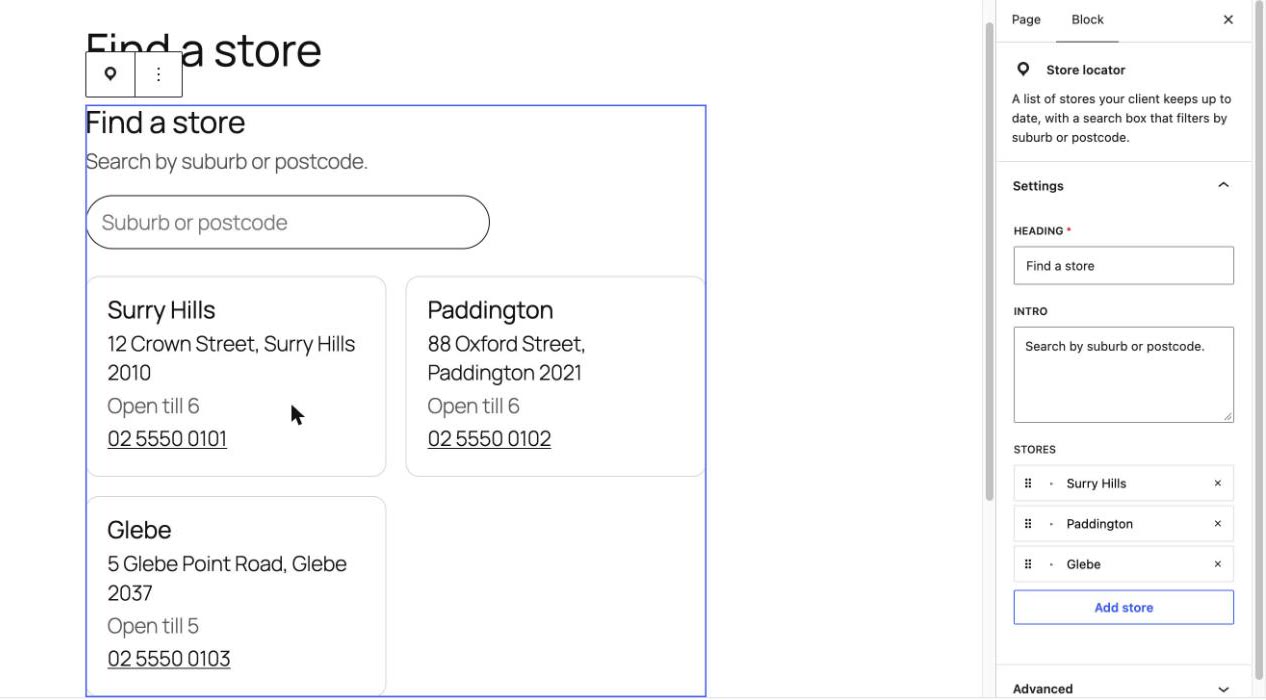
A list of stores with a search box that filters it by suburb or postcode. Your client keeps the stores up to date in the block's sidebar, and types the heading, the intro and each store's name right on the page. It is three plain files in your theme, plus a small stylesheet and script.
Download example A zip of one block folder for your theme. Needs GCB 1.3.1 or later, and nothing else.
The whole block
Create blocks/store-locator/ in your theme. The folder name is the block's name, so this registers as gcb/store-locator. These are all of its files.
block.json is WordPress's standard block metadata. There are no attributes in it: GCB makes them from the fields.
{ "apiVersion": 3, "name": "gcb/store-locator", "title": "Store locator", "description": "A list of stores your client keeps up to date, with a search box that filters by suburb or postcode.", "category": "widgets", "icon": "location", "style": "file:./style.css", "viewScript": "file:./view.js"}block.fields.json lists the fields. The heading is required and limited to 60 characters, so the page won't save without one. The stores are a repeater: a list of rows, each with the same small set of fields, from 1 to 60 rows.
{ "controls": [ { "id": "c_heading", "type": "text", "label": "Heading", "attributeKey": "heading", "default": "Find a store", "validation": { "required": true, "maxLength": 60 } }, { "id": "c_intro", "type": "textarea", "label": "Intro", "attributeKey": "intro", "default": "Search by suburb or postcode.", "validation": { "maxLength": 160 } }, { "id": "c_stores", "type": "repeater", "label": "Stores", "attributeKey": "stores", "addButtonLabel": "Add store", "collapsedTitle": "name", "min": 1, "max": 60, "fields": [ { "id": "name", "type": "text", "label": "Name", "attributeKey": "name", "validation": { "required": true } }, { "id": "address", "type": "text", "label": "Street address", "attributeKey": "address" }, { "id": "suburb", "type": "text", "label": "Suburb", "attributeKey": "suburb" }, { "id": "postcode", "type": "text", "label": "Postcode", "attributeKey": "postcode" }, { "id": "phone", "type": "text", "label": "Phone", "attributeKey": "phone" }, { "id": "hours", "type": "text", "label": "Opening hours", "attributeKey": "hours" } ], "default": [ { "_id": "s1", "name": "Surry Hills", "address": "12 Crown Street", "suburb": "Surry Hills", "postcode": "2010", "phone": "02 5550 0101", "hours": "Open till 6" }, { "_id": "s2", "name": "Paddington", "address": "88 Oxford Street", "suburb": "Paddington", "postcode": "2021", "phone": "02 5550 0102", "hours": "Open till 6" }, { "_id": "s3", "name": "Glebe", "address": "5 Glebe Point Road", "suburb": "Glebe", "postcode": "2037", "phone": "02 5550 0103", "hours": "Open till 5" } ] } ]}render.php is the template, for the editor and the page alike. It reads the values from $attributes, the same as a core block's PHP render. The three data-gcb-field attributes are what let your client type the heading, the intro and a store's name on the page.
<?php/** * Store locator: a heading, an intro and a list of stores, with a search box that filters the list. * * The heading, the intro and each store's name are typed on the page in the editor (the data-gcb-field * attributes). The stores are rows of a repeater field, kept in the sidebar. * * @var array $attributes The block's field values. */ $heading = (string) ( $attributes['heading'] ?? '' );$intro = (string) ( $attributes['intro'] ?? '' );$stores = (array) ( $attributes['stores'] ?? array() );$id = wp_unique_id( 'store-search-' );?><section <?php echo get_block_wrapper_attributes( array( 'class' => 'store-locator' ) ); ?>> <h2 class="store-locator__heading" data-gcb-field="heading" data-gcb-field-type="text"><?php echo esc_html( $heading ); ?></h2> <?php if ( '' !== $intro ) : ?> <p class="store-locator__intro" data-gcb-field="intro" data-gcb-field-type="textarea"><?php echo esc_html( $intro ); ?></p> <?php endif; ?> <label class="screen-reader-text" for="<?php echo esc_attr( $id ); ?>"><?php esc_html_e( 'Search by suburb or postcode', 'default' ); ?></label> <input class="store-locator__search" id="<?php echo esc_attr( $id ); ?>" type="search" placeholder="<?php esc_attr_e( 'Suburb or postcode', 'default' ); ?>" autocomplete="off"> <ul class="store-locator__list" role="list"> <?php foreach ( $stores as $i => $row ) : $row = (array) $row; $row_id = (string) ( $row['_id'] ?? $i ); $name = (string) ( $row['name'] ?? '' ); $phone = (string) ( $row['phone'] ?? '' ); $where = trim( implode( ', ', array_filter( array( $row['address'] ?? '', $row['suburb'] ?? '' ) ) ) . ' ' . ( $row['postcode'] ?? '' ) ); $search = strtolower( $name . ' ' . $where ); ?> <li class="store-locator__store" data-store-search="<?php echo esc_attr( $search ); ?>"> <h3 class="store-locator__name" data-gcb-field="stores" data-gcb-row="<?php echo esc_attr( $row_id ); ?>" data-gcb-subfield="name" data-gcb-field-type="text"><?php echo esc_html( $name ); ?></h3> <?php if ( '' !== $where ) : ?> <p class="store-locator__where"><?php echo esc_html( $where ); ?></p> <?php endif; ?> <?php if ( ! empty( $row['hours'] ) ) : ?> <p class="store-locator__hours"><?php echo esc_html( $row['hours'] ); ?></p> <?php endif; ?> <?php if ( '' !== $phone ) : ?> <p class="store-locator__phone"><a href="tel:<?php echo esc_attr( preg_replace( '/[^0-9+]/', '', $phone ) ); ?>"><?php echo esc_html( $phone ); ?></a></p> <?php endif; ?> </li> <?php endforeach; ?> </ul> <p class="store-locator__none" hidden><?php esc_html_e( 'No stores match that search.', 'default' ); ?></p></section>view.js filters the list as the visitor types. WordPress loads it on the front of the site only. With no script, every store shows.
/* Store locator: filter the list as the visitor types. With no script, every store shows. */document.querySelectorAll( '.store-locator' ).forEach( ( locator ) => { const input = locator.querySelector( '.store-locator__search' ); const stores = locator.querySelectorAll( '.store-locator__store' ); const none = locator.querySelector( '.store-locator__none' ); if ( ! input ) { return; } input.addEventListener( 'input', () => { const term = input.value.toLowerCase().trim(); let shown = 0; stores.forEach( ( store ) => { const match = ( store.dataset.storeSearch || '' ).includes( term ); store.hidden = ! match; shown += match ? 1 : 0; } ); if ( none ) { none.hidden = shown > 0; } } );} );style.css is a plain starting look. Replace it with your design.
.store-locator { max-width: 960px; margin-inline: auto; }.store-locator__heading { margin: 0 0 8px; }.store-locator__intro { margin: 0 0 20px; opacity: .75; }.store-locator__search { width: 100%; max-width: 420px; padding: 12px 16px; font: inherit; border: 1px solid currentColor; border-radius: 999px; background: transparent; color: inherit; }.store-locator__list { list-style: none; margin: 28px 0 0; padding: 0; display: grid; gap: 20px; grid-template-columns: repeat(auto-fill, minmax(240px, 1fr)); }.store-locator__store { padding: 20px 22px; border: 1px solid color-mix(in srgb, currentColor 18%, transparent); border-radius: 14px; }.store-locator__store[hidden] { display: none; }.store-locator__name { margin: 0 0 6px; font-size: 1.15em; }.store-locator__where, .store-locator__hours, .store-locator__phone { margin: 0 0 4px; }.store-locator__hours { opacity: .7; }.store-locator__phone a { color: inherit; }.store-locator__none { margin: 24px 0 0; opacity: .75; }That is the whole block. There is no edit.js, no npm and no build step: save the files, reload the editor, and it is in the inserter.
What your client does
- Clicks the heading or the intro and types.
- Clicks a store's name on the page and types, or opens Stores in the sidebar to change its address, phone and hours.
- Presses Add store for a new one, drags the rows to reorder them, and removes one that has closed.
They can't save the page with no heading or with no stores, and they can't change the layout.
When you have a lot of stores
Rows in a block suit a few dozen stores on one page. For hundreds, or stores that appear on several pages, make each store a post of its own: register a store post type, give it typed fields with gcb_register_post_fields(), and list them in the block with a query-loop field, which pages and filters the list for you.
Use it
- Unzip the download.
- Copy
store-locator/into your theme'sblocks/folder. - Reload the block editor. Store locator is in the inserter.
That's all of it. You don't register the block: there's no register_block_type() call and nothing to add to functions.php. GCB registers every folder in your theme's blocks/ folder by itself.
More examples: all examples, or download them together as the GCB Kit. To build one from nothing, see how to build a block.