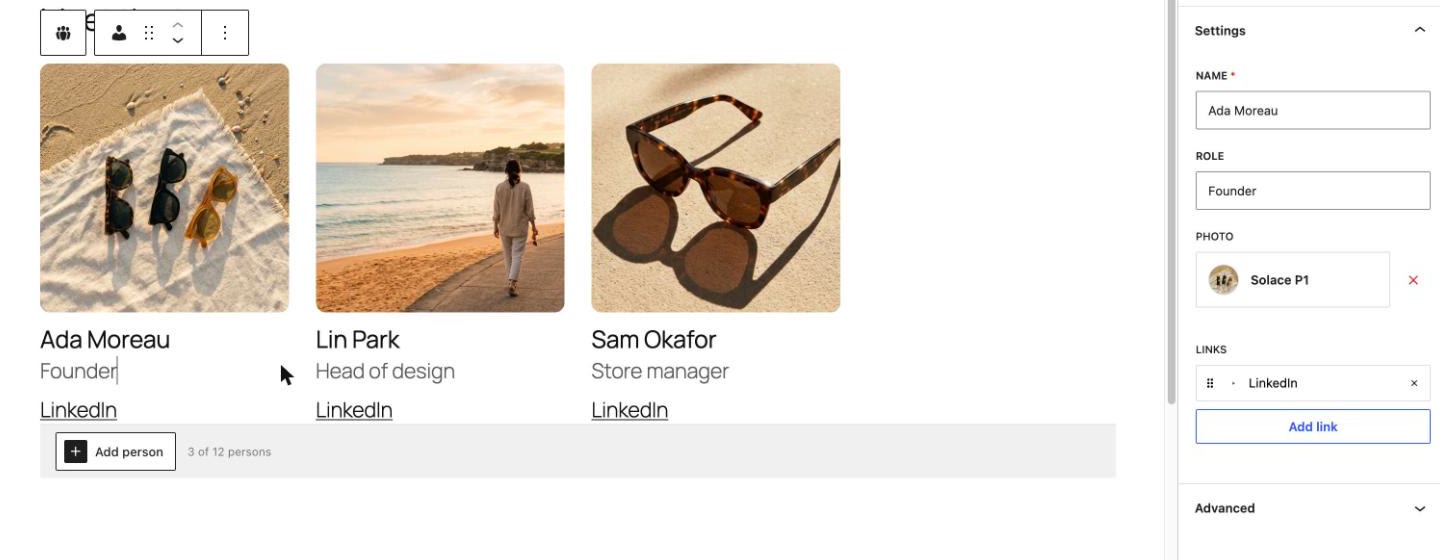
A grid of people. Each person is a block of their own: a photo, a name, a role and up to three links. Your client adds a person with one button, types the name and role on the page, and drags the cards to reorder them. It is two block folders: the grid and the person.
Download example A zip of two block folders for your theme. Needs GCB 1.3.1 or later, and nothing else.
The whole block
Create blocks/team/ and blocks/team-member/ in your theme. They register as gcb/team and gcb/team-member.
The grid: team
{ "apiVersion": 3, "name": "gcb/team", "title": "Team", "description": "A grid of people. Each person is a card your client fills in on the page.", "category": "design", "icon": "groups", "supports": { "html": false, "align": [ "wide", "full" ] }, "style": "file:./style.css"}{ "controls": [ { "id": "c_heading", "type": "text", "label": "Heading", "attributeKey": "heading", "default": "Meet the team", "validation": { "maxLength": 60 } } ]}The template marks where the people go with a <Repeater>. That one marker holds every rule about them: which block a person is, the label on the Add button, how many a new block starts with, and the fewest and most there can be. editLayout="grid" tells the editor to show the people where your CSS puts them.
<?php/** * Team: a heading and a grid of people. * * Each person is a block of its own (gcb/team-member). The <Repeater> marker says where they go, which block a * person is, and how few and how many there can be. WordPress won't save a page outside those limits. * * @var array $attributes The block's field values. */ $heading = (string) ( $attributes['heading'] ?? '' );?><section <?php echo get_block_wrapper_attributes( array( 'class' => 'team-block' ) ); ?>> <?php if ( '' !== $heading ) : ?> <h2 class="team-block__heading" data-gcb-field="heading" data-gcb-field-type="text"><?php echo esc_html( $heading ); ?></h2> <?php endif; ?> <div class="team-block__grid"> <Repeater allowedBlocks='["gcb/team-member"]' addButtonLabel="Add person" min="1" max="12" defaultChildren="3" editLayout="grid" /> </div></section>.team-block__heading { margin: 0 0 28px; }.team-block__grid { display: grid; gap: 28px; grid-template-columns: repeat(auto-fill, minmax(220px, 1fr)); }.team-member { margin: 0; }.team-member__photo { aspect-ratio: 1 / 1; margin: 0 0 14px; border-radius: 10px; overflow: hidden; background: #ece8e1; }.team-member__photo img { width: 100%; height: 100%; max-width: none; object-fit: cover; display: block; }.team-member__name { margin: 0; font-size: 1.15em; }.team-member__role { margin: 4px 0 0; opacity: .7; }.team-member__links { list-style: none; margin: 10px 0 0; padding: 0; display: flex; gap: 14px; }.team-member__links a { color: inherit; }The person: team-member
parent in its block.json means a person is only offered inside a Team block.
{ "apiVersion": 3, "name": "gcb/team-member", "title": "Person", "description": "One person on the Team block: a photo, a name, a role and up to three links.", "category": "design", "icon": "admin-users", "parent": [ "gcb/team" ], "supports": { "html": false }}The name is required. The links are a repeater field with a max of 3: rows in the sidebar, each with a label and an address.
{ "controls": [ { "id": "c_photo", "type": "image", "label": "Photo", "attributeKey": "photo", "enableFocalPoint": true }, { "id": "c_name", "type": "text", "label": "Name", "attributeKey": "name", "default": "", "validation": { "required": true, "maxLength": 48 } }, { "id": "c_role", "type": "text", "label": "Role", "attributeKey": "role", "default": "", "validation": { "maxLength": 60 } }, { "id": "c_links", "type": "repeater", "label": "Links", "attributeKey": "links", "addButtonLabel": "Add link", "collapsedTitle": "label", "max": 3, "fields": [ { "id": "label", "type": "text", "label": "Label", "attributeKey": "label" }, { "id": "url", "type": "text", "label": "Address", "attributeKey": "url" } ] } ]}<?php/** * Person: one card on the Team block. * * The name and the role are typed on the page. The photo opens the media library and takes a focal point. * The links are rows in the sidebar, three at most. * * @var array $attributes The block's field values. */ $as_array = static function ( $value ) { return is_object( $value ) ? json_decode( wp_json_encode( $value ), true ) : (array) $value;}; $photo = $as_array( $attributes['photo'] ?? array() );$focal = $as_array( $photo['focalPoint'] ?? array() ) + array( 'x' => 0.5, 'y' => 0.5 );$place = round( (float) $focal['x'] * 100 ) . '% ' . round( (float) $focal['y'] * 100 ) . '%';$links = (array) ( $attributes['links'] ?? array() );?><article <?php echo get_block_wrapper_attributes( array( 'class' => 'team-member' ) ); ?>> <div class="team-member__photo"> <?php if ( ! empty( $photo['url'] ) ) : ?> <img data-gcb-field="photo" data-gcb-field-type="image" src="<?php echo esc_url( $photo['url'] ); ?>" alt="<?php echo esc_attr( $photo['alt'] ?? '' ); ?>" style="object-position:<?php echo esc_attr( $place ); ?>"> <?php endif; ?> </div> <h3 class="team-member__name" data-gcb-field="name" data-gcb-field-type="text"><?php echo esc_html( $attributes['name'] ?? '' ); ?></h3> <p class="team-member__role" data-gcb-field="role" data-gcb-field-type="text"><?php echo esc_html( $attributes['role'] ?? '' ); ?></p> <?php if ( $links ) : ?> <ul class="team-member__links" role="list"> <?php foreach ( $links as $row ) : $row = (array) $row; if ( empty( $row['url'] ) || empty( $row['label'] ) ) { continue; } ?> <li><a href="<?php echo esc_url( $row['url'] ); ?>"><?php echo esc_html( $row['label'] ); ?></a></li> <?php endforeach; ?> </ul> <?php endif; ?></article>That is all of it. There is no edit.js, no npm and no build step: save the files, reload the editor, and the block is in the inserter.
What your client does
- Presses Add person. A new card arrives, laid out like the others.
- Clicks a name or a role and types.
- Selects a photo and presses Photo in the toolbar to swap it.
- Adds up to three links in the sidebar.
- Drags the cards to reorder them.
They can't add a thirteenth person or a fourth link, and they can't save a person with no name.
Use it
- Unzip the download.
- Copy
team/andteam-member/into your theme'sblocks/folder. - Reload the block editor.
That's all of it. You don't register the block: there's no register_block_type() call and nothing to add to functions.php. GCB registers every folder in your theme's blocks/ folder by itself.
More examples: all examples, or download them together as the GCB Kit. To build one from nothing, see how to build a block.